Explore More Gemini Models in the Text Agent Action
When using the Gemini Text Agent action in Zenphi, you can choose from three model options: Flash-Lite, Flash, and Pro. These options automatically use the latest available model in their respective families.
However, you may want to use an older model for compatibility or specific requirements, or try a different model for your workflow.
Good news! Google has introduced additional models, including Gemini 4 Argon and Gemini 4 Carbon, which you can try by specifying their model IDs.
What are Argon and Carbon?
Gemini 4 Argon (gemini-4-argon): Designed for advanced reasoning, complex coding, mathematical and scientific problem-solving, and multi-step agent workflows. Consider it when your workflow requires deeper analysis or more complex decision-making.
Gemini 4 Carbon (gemini-4-carbon): Google's strongest reasoning model, designed for demanding tasks such as complex software engineering, scientific reasoning, and long-running, multi-step problem-solving. Consider it when your workflow requires the highest level of reasoning for particularly challenging tasks.
Compared with Flash-Lite, Flash, and Pro, these models focus more on advanced reasoning and complex tasks. They may be worth testing when your current model struggles with a workflow's complexity, although performance, response time, and cost will vary.
How to use them in Zenphi
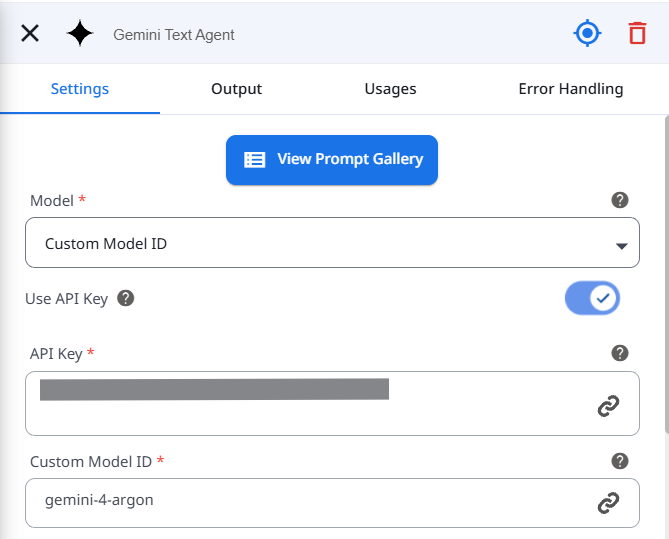
Open your Gemini Text Agent action.
Open the model dropdown and select Custom Model ID.
Enter the model ID of your choice:
Argon: gemini-4-argon
Carbon: gemini-4-carbon
Make sure the selected model is supported by the Gemini API configuration you're using and is available to your account.
Why try these models?
Using a custom model ID gives you more flexibility to choose the model that best fits your workflow. You can experiment with newer models, retain an older model when needed, and compare reasoning quality, execution time, and cost to find the right balance for your use case.